A Notion vs Evernote choice usually becomes real after a mess: an article clipped for later, a client detail trapped in a notebook, or a task buried inside meeting notes.
Both tools hold information, but they create different habits. Evernote is built for capture and retrieval, while Notion turns notes into linked pages, records, and shared work.
This guide shows whether your filing habits get easier or become more work.
Evernote Is Strong When You Need to Catch Something Before It Disappears
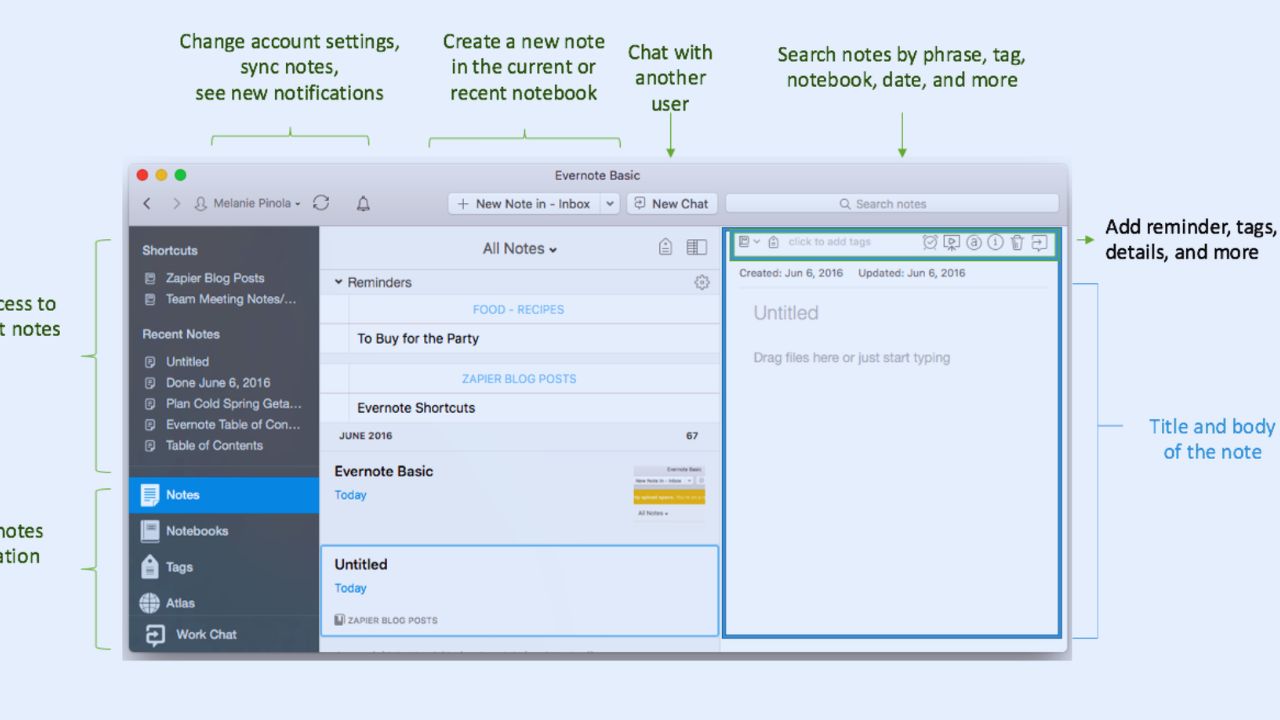
Evernote often feels natural when the job is saving and finding material quickly.
A researcher can clip a webpage, scan a receipt, or record a voice note, then tag it before moving on. Its notebooks and tags are familiar enough that a new user can begin without redesigning a system.
That makes fast capture central, with reliable retrieval as a reason many people stay.
The Web Clipper Is More Useful Than a Bookmark Folder
A browser bookmark remembers where a page was; it does not preserve the quote or note explaining why it mattered.
Evernote’s Web Clipper saves web material into a chosen notebook, where a user can add tags or a comment while the idea is fresh.
For students, shoppers, journalists, and consultants, it turns a loose research trail into usable material. The gain is context beside the source, not simply more saved links.
Search Helps When You Do Not Remember Where You Filed It
Evernote suits someone who remembers a phrase, a receipt date, or an attachment but not the notebook name.
Its search can surface notes and attachment text in archives built through daily capture.
Tags still help, but a perfect system is not required before saving the first hundred items. The limit is that search finds material without turning it into a project plan or structured workflow.
Notion Starts Paying Off When Notes Need to Become Connected Work
Notion is more compelling when one note must lead somewhere. A content team can connect a brief to a writer, draft, approval status, publish date, and research without copying information.
Pages hold ordinary writing, while databases organize repeat work as boards, calendars, timelines, tables, or filtered lists. This keeps shared context closer, but it also asks users to decide what each record means.
A Database Is Not Automatically Better Than a Notebook
A database helps when people need different views of the same current items.
One person may need a calendar of deadlines, another a list of open approvals, and a manager a view of stalled work. It is unnecessary when a simple note would answer the question faster.
New users often overbuild because every collection looks like a database candidate. Keep only useful properties and make each view answer one question.
Also Read: Notion Daily User Review: Real-World Performance of the All-in-One Productivity App
Templates Should Shorten Setup, Not Replace Judgment
Notion’s template marketplace offers a starting point for an editorial calendar, study planner, client hub, or team wiki.
The mistake is importing a polished setup before knowing how work moves. A complex system with unused fields becomes cluttered and difficult to explain.
Start with an ordinary project, remove what is not used, and let repetition reveal gaps. That creates a working structure rather than a borrowed dashboard.
The Daily Difference Is Smaller Than the Marketing Often Suggests
Both platforms handle notes, tasks, web capture, sharing, and basic organization. The split appears when something changes.
Evernote is often quicker for putting information away with little planning; Notion is stronger when a note must be linked, reassigned, filtered, or reused in a process.
Someone collecting research may prefer Evernote’s directness. A team that revisits the same work from different angles may value flexible records over simple filing.
Mobile and Offline Work Need a Real-World Test
A phone is where many notes begin, but not where every workspace should be maintained.
Evernote’s paid plans support more than one device and offline use, while the Free plan has a one-device limit. Notion lets members download individual pages offline; paid plans can automatically download recent and favorite pages.
Database use is more limited offline, so test the pages you need and the device you carry.
Price Is a Workflow Question Before It Is a Monthly Number
Notion’s Free plan is broad for a single person, while its Plus plan is listed at $10 per member per month and Business at $20 in USD.
Evernote now offers Starter and Advanced, with price and availability varying by market; Starter has limits on notes, notebooks, attachments, storage, and devices.
Do not compare a monthly figure alone. Compare the limits you will hit with the routine you need to protect.
AI Features Are Useful Only After the Basics Work
Notion includes trial AI features on Free and Plus, while Business includes Agent, AI Meeting Notes, and connected search.
Evernote’s Starter and Advanced plans include AI tools, transcription, web clipping, and mobile capture.
Those features can shorten summaries or draft material, but they do not repair a messy structure or unclear task owner. Treat assistance as a layer on top of a working habit, not as the habit itself.
A Five-Day Trial Reveals More Than a Feature Grid
Use both apps on one live piece of work: a client project, study unit, trip plan, research question, or content cycle.
Capture information from your phone, return on a computer, create one follow-up task, and find the right detail on day four.
Avoid judging templates during the first hour. Use these small checks to see whether the tool supports your actual rhythm:
- Can you save an idea before it becomes another open tab?
- Can you find a needed detail without remembering the exact location?
- Can you turn a note into the next action without copying it?
The Better Tool Is the One That Leaves Less Unfinished Thinking Behind
Evernote may suit someone who collects notes, web pages, scans, and references, then wants dependable search.
Notion may be better for a person or team that needs notes to connect with tasks, processes, databases, and shared decisions. Neither is a universal replacement, and both become cluttered when old material is never reviewed.
Start with one recurring problem, notice the friction that remains, and choose the tool that helps you close the loop without turning organization into a second job.