A fair Notion vs Confluence comparison begins when a team cannot remember where a decision was made.
One tool may hold a launch brief, task board, customer feedback, and meeting notes; the other may preserve a procedure people rely on months later.
Notion favors adaptable workspaces, while Confluence suits durable knowledge. The better fit depends on whether your team needs to coordinate changing work or protect established documentation.
The Difference Appears on the First Project That Changes Shape
Imagine a product launch whose plan changes after feedback and before release. In Notion, one workspace can hold the brief, a task database, linked notes, a calendar, and assets.

That suits teams whose process changes as they learn, because pages and records can grow together rather than being forced into a fixed tree.
The risk is that everyone builds a slightly different tracker, leaving duplicate systems when the urgency passes.
Notion Gives Mixed Teams Room to Shape Their Own Workflow
A marketing lead may want a campaign calendar, while a designer needs a gallery of reference images and a writer needs a filtered queue of briefs.
Notion can show the same underlying work in different ways, which reduces copying. That freedom helps a small group move quickly, but it also requires shared names for stages, owners, and final pages.
Without them, flexibility turns into searching, and a workspace that looked elegant in week one becomes harder to trust by week six.
Confluence Makes the Structure Visible Before People Start Writing
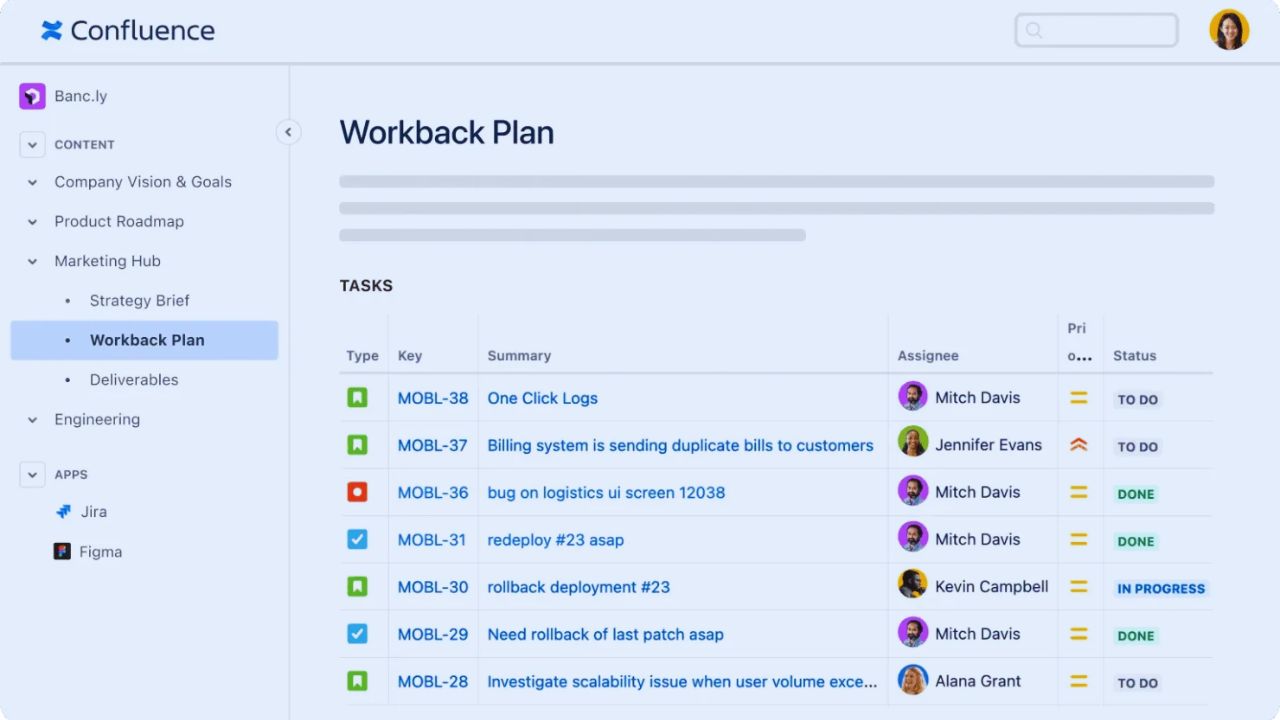
Confluence begins from a different assumption: people should know where durable knowledge belongs.
Spaces, page trees, templates, and revision history separate an engineering runbook from a team handbook or product specification.
A new employee can follow an established path rather than deciphering personal dashboards. The interface may feel more formal, yet that formality can protect consistent navigation and long-lived documentation when authors change roles or leave the company.
A Jira-Centered Team Should Test Confluence Before Rebuilding Anything Else
The decision becomes less abstract when Jira already holds tickets, incidents, releases, and backlog work.
Confluence can place issue context beside specifications, postmortems, and decisions, reducing the urge to paste a status update into several systems.
That connection is especially useful for software, IT, security, and operations teams where a page must point to work that changes daily. It will not automatically help a brand team running loose creative projects, but existing tool habits and Jira-centered work matter more than a polished demo.
Not Every Department Needs the Same Home
A company can use Confluence for engineering standards and Notion for a content calendar, research hub, or small initiative.
Forcing everyone into one platform can create a larger problem than using two tools with clear boundaries.
Decide which system holds the authoritative version of a policy, project status, customer record, or meeting decision. Then teach people where to publish the final answer and maintain clear boundaries, not merely where to start a conversation.
Also Read: Notion Review: Where This Tool Needs Improvement
Price Is Only Honest When You Include the Work Around the Subscription
US list pricing puts Notion Plus at $10 and Business at $20 per member each month, while Confluence lists Standard at $5.42 and Premium at $10.44 per user; both offer free options with limits. Those figures do not settle value.
A small team may spend more on Notion and still save money if it replaces a notes tool, lightweight tracker, and form builder. A large Jira customer may find Confluence cheaper because the documentation layer sits inside an existing operating stack.
Count Editors, Guests, Administrators, and the Cost of Disorder
The seat count is rarely the whole story. Ask who needs to edit, who can comment, who only needs read access, and who must administer permissions or report on activity.
Also price the hours spent migrating pages, removing duplicates, teaching templates, and answering “where does this go?” during rollout.
A low subscription price loses appeal if the team maintains three competing knowledge bases. Good procurement includes adoption time and administrative effort, not only the invoice.
Governance Becomes Practical When a Page Can Affect a Customer or an Audit
Security claims matter after you identify what the workspace will store. Notion offers SAML SSO for Business and Enterprise plans, while Enterprise owners can use audit logs; Confluence also provides audit logging on paid plans, with access varying by plan and administrator role.
Those controls may matter to regulated teams, but badges alone do not decide whether a system is safe for contracts, health information, financial data, or internal investigations.
Map content types, access groups, retention expectations, and external guests before relying on permission settings or vendor assurances.
Mobile Should Be Tested in the Places People Actually Work
A phone is excellent for reading a procedure, adding a field note, approving a simple draft, or catching a missed task between meetings. It is poor for redesigning a large knowledge structure, reviewing wide databases, or untangling space permissions.
Notion often feels lighter for quick capture and flexible records; Confluence can be more comfortable when people mainly consume established pages.
Test the app during a normal day, not a clean demo. The relevant question is whether mobile access supports the moment of work without pushing the update back to chat.
Put Both Platforms Through One Real Week Before Making a Migration Plan
Choose an active piece of work with deadlines and handoffs: a launch, onboarding process, incident follow-up, or client delivery.
Build the smallest workable version in each tool and let the people who will use it write, update, search, comment, and hand work to someone else.
Do not reward the prettier setup; watch for missing decisions, pages people avoid, and updates that return to email or chat.
These three signals expose whether a platform supports ordinary pressure or merely produces a convincing prototype:
- Can a new teammate locate the current decision without an explanation?
- Does the owner know where to record the next change?
- Can the team maintain the setup without a specialist rescuer?
The Better Choice Is the One That Makes Responsibility Easier to See
Notion may suit a team that needs flexible records, lightweight project coordination, and changing context in one working space.
Confluence may suit a team that needs a durable knowledge structure, close Jira links, and a clearer audit trail around established documentation.
Neither tool repairs unclear ownership, weak writing, or a habit of keeping decisions in private messages. Choose the place where current information stays visible, responsibility is obvious, and a new colleague can contribute without asking which page everyone has quietly stopped using.