Asana vs ClickUp is not a contest between simple and powerful tools. Both organize projects, assign work, and show progress, but they create different habits in daily use.
Asana favors guided structure people can grasp quickly; ClickUp offers a broader workspace teams can shape.
The right choice depends on whether your bigger problem is slow adoption or fragmented work.
The Real Difference Appears in the First Two Weeks
A platform can look convincing in a demonstration and still feel awkward after deadlines arrive.
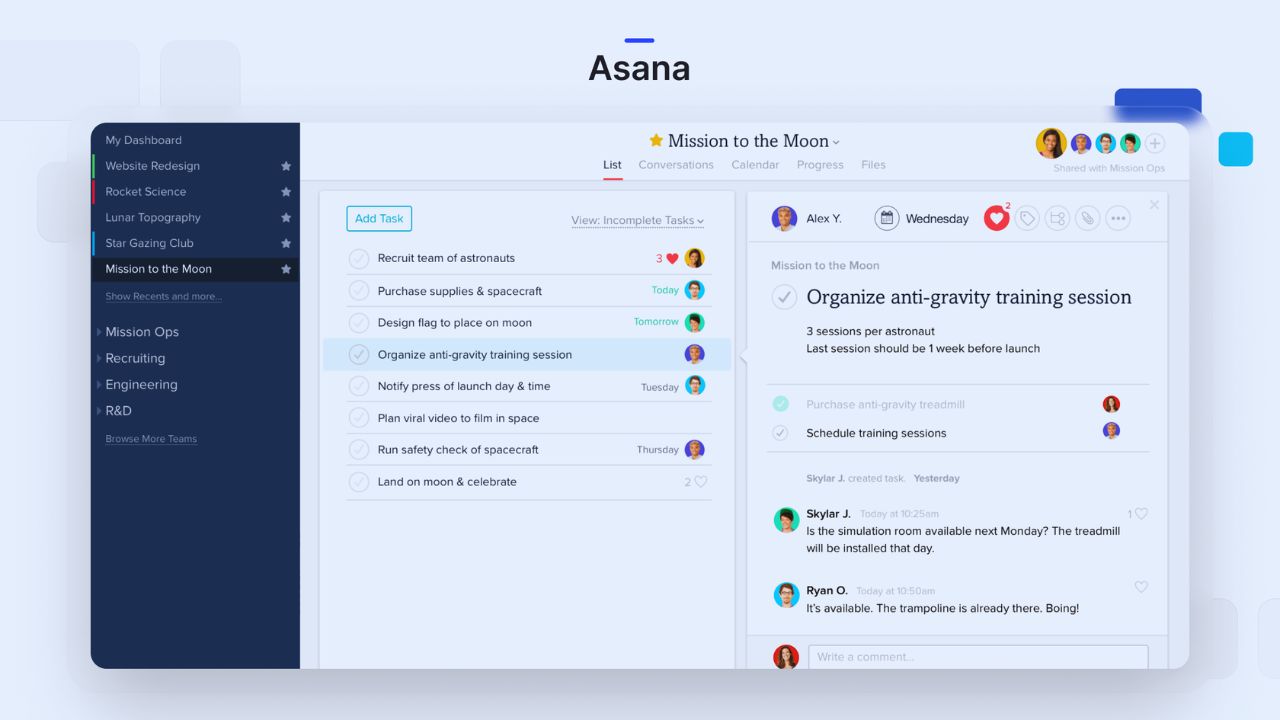
The first test is not whether people can create tasks. It is whether they can open it during a busy meeting, see the next step, and record a decision without opening another channel.
That is where default structure and daily behavior outweigh a feature list.
Asana Reduces Decisions for Teams That Need a Clear Starting Point
Asana gives work a recognizable hierarchy: teams, projects, tasks, and subtasks.
Tasks hold owners, dates, comments, and attachments, while list, board, calendar, and timeline views cover many campaign, operations, and planning routines.
A new coordinator can usually grasp the logic without learning long settings menus. It suits organizations that value quick onboarding and shared conventions over deep customization.
ClickUp Lets a Team Build More of the System Itself
ClickUp brings tasks, Docs, Chat, Whiteboards, Dashboards, Forms, Goals, time tracking, and multiple views into one workspace.
That range can replace disconnected tools when a team is tired of copying between boards, knowledge bases, chat apps, and spreadsheets.
It also creates uncertainty when departments build different hierarchies and statuses. The tradeoff is greater flexibility and more administration.
Day-to-Day Collaboration Is Where the Choice Becomes Personal
A marketing team with recurring launches may prefer a fixed template, few task states, and readable status updates.
A client-services group may need email threads, time entries, intake forms, documents, and customer tasks together.
Neither approach is more mature. The question is which platform mirrors the actual handoffs and information flow already in place.
Pick Asana When Consistency Is More Valuable Than Endless Options
Asana can be easier to govern because its project model encourages similar working habits.
Rules, templates, forms, portfolios, workload, and reporting add depth without making every user design a workspace.
This helps teams that need reliable planning, reviews, and leadership updates. It is particularly useful when a project manager needs clean status reporting and predictable ownership across departments.
Pick ClickUp When Consolidation Solves a Genuine Problem
ClickUp is more persuasive when people lose context across separate apps.
An agency, for example, might keep a client brief in a Doc, map a campaign on a Whiteboard, route requests through Forms, log time on tasks, and discuss revisions in Chat.
That can reduce copying and chasing, but it works only when someone maintains workspace standards and clear boundaries.
Automation and AI Help Only After the Process Is Understood
Both platforms can reduce updating, summarize work, and support routine follow-through.
The mistake is enabling every rule before a team agrees what complete, blocked, or approved means.
Automation magnifies whatever already exists. Begin with repeatable handoffs and visible accountability, then use AI and rules to remove proven manual work.
A Practical First Rule Should Be Easy to Explain
In Asana, a rule might route a submitted request and assign the reviewer. In ClickUp, it might assign a task when a form arrives or move a ready item into review.
Avoid complicated branches and status changes nobody can reverse with confidence. Prioritize easy recovery and transparent logic before building a larger library.
Reporting Reveals Whether Your Data Is Strong Enough to Trust
Leaders often request dashboards before the task system is stable.
Asana’s portfolio, workload, and universal reporting can show project health, capacity, goals, and cross-portfolio work when underlying data is consistent.
ClickUp dashboards are more configurable and can combine task, workload, goal, and time data. Both depend on honest updates and consistent definitions, not a dashboard template.
Capacity Planning Needs More Than Assigned Names
An assigned task does not show whether someone has room for it.
Teams need realistic estimates, current dates, priorities, and a way to separate committed work from possible requests. Asana’s workload tools may suit teams that prefer portfolio-level planning.
ClickUp can suit groups that want time tracking and customized dashboard signals near task data. Compare planning habits and data quality before using either as a staffing decision.
Also Read: Final Verdict After Hands-On Testing: My Real Experience with Notion for Digital Productivity
The Friction Is Different in Each Platform During Adoption
With Asana, frustration usually comes when a team wants a workflow the platform does not naturally emphasize, such as deeply customized intake, an internal knowledge hub, or many specialized views.
With ClickUp, frustration more often arrives before adoption: people see too many places to put work and create duplicate lists, statuses, or folders before work grows harder to untangle.
Neither issue is fatal, but each demands a different response. Asana teams should resist workarounds that hide decisions; ClickUp teams should set workspace rules early and limit optional features until everyone understands the core path.
Pricing Matters Most When Feature Gates Change Your Process
Both products offer a free entry point, but the real comparison begins when a team needs advanced views, reporting, workload controls, security, integrations, or more automation.
ClickUp may cost less when it replaces tools for documents, chat, whiteboards, or time tracking.
Asana may justify a higher tier when its structure, reporting, templates, and portfolios reduce overhead. Compare the full tool stack and admin time, not only per-user price.
Run a Trial Around One Painful Workflow
Do not test either platform with an empty project called “Marketing Plan.”
Choose a workflow that already loses time: client intake, content approvals, release coordination, or onboarding.
Move live work, ask real users to update it, and see whether managers can spot blockers without a spreadsheet. The trial should reveal adoption friction and practical value, not polished templates.
Three Questions Can Prevent an Expensive Migration
Before moving an entire department, use these decision checks to focus on real operating needs:
- Do we need more consistency or more customization?
- Which tools would this platform realistically replace?
- Who will own workspace governance after launch?
The Better Choice Is the One Your Team Will Keep Current
Choose Asana when the team needs dependable structure, faster onboarding, and a calm path from tasks to leadership visibility.
Choose ClickUp when it benefits from a configurable workspace that brings projects, documents, chat, time, and planning tools together.
Neither can cure unclear priorities, weak ownership, or work hidden in private messages. Begin with one active workflow, name an administrator, and measure cleaner decisions and less follow-up before expanding.