
A workspace full of notes can look organized while leaving people unable to find a decision, owner, or current version.
Notion Key Features matter when they turn scattered documents into a place for work.
This guide examines writing, databases, AI, access, and automation through problems that appear after the first week. The aim is shared context, not a prettier pile of pages.
Start With the Information People Keep Asking For
Notion works best when the same information is rebuilt in chat, slide decks, and files.
A marketing team may need one campaign brief, while operations may need a procedure and record of exceptions.
Put those items where people doing the work can update them, rather than creating a polished library nobody maintains.
This makes everyday knowledge reusable and gives current ownership a visible home.
Documents Need a Clear Job, Not Endless Nesting
A workspace becomes hard to trust when five pages explain the same process differently.
Give each page one job: source procedure, meeting record, project brief, or decision log.
Use links and backlinks when they show a relationship, not to make the space look connected.
Keep navigation short enough for a new employee to scan. This protects findability and reduces duplicate content.
Databases Turn Repeated Work Into Something Teams Can See
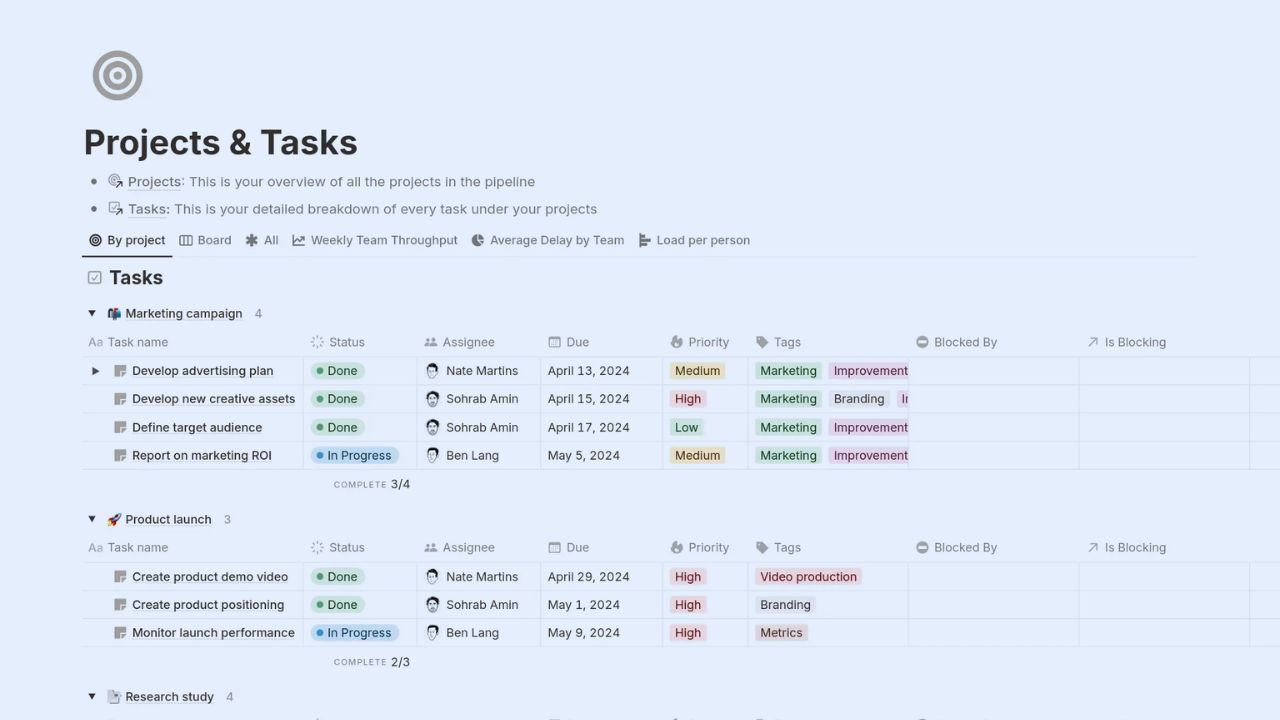
Databases are where Notion becomes more than a writing tool. Information can appear as a table, board, calendar, timeline, gallery, list, or chart, giving tasks, editorial work, and client requests different useful views.
Properties like owner, due date, stage, and priority give each entry context.
That works when each view answers a question, not when a team creates layouts because it can.
Strong databases create useful visibility and consistent records.
Build Properties Around Decisions, Not Curiosity
A field should earn its place by changing an action.
A content manager may need status, owner, publication date, and channel; support may need severity, requester, and resolution note. Begin with the smallest set that sorts active work and identifies real blockers, then revise after a real month of use.
This keeps data entry reasonable and protects reporting quality as the database grows.
Notion AI Helps Most When the Source Material Is Already Good
Notion AI can draft outlines, rewrite rough paragraphs, summarize pages, extract action items, or answer questions from a workspace and connected sources.
It saves time when a team has reliable notes, current policies, and clear, specific prompts. It cannot repair outdated pages or decide whether a proposal is accurate.
Treat AI as editing support and faster retrieval, then check important facts, context, and tone before sharing results with others.
Meeting Notes and Search Still Need Human Follow Through
AI meeting notes can capture and organize discussion, while search can surface pages and connected information.
These features may reduce time spent hunting for a decision after a call. They do not remove the need to name an owner, confirm deadline, or correct a summary.
Afterward, someone should review the record, assign next step, and link it to the related project. That turns captured discussion into actionable work.
Templates and Forms Can Make Intake Less Chaotic
A blank page invites inconsistent requests. A content brief, creative request, client handoff, or onboarding template gives people starting questions and makes review faster.
Forms can collect information from people outside the workspace and send responses into a database, which suits a request queue or feedback process.
Keep templates short enough that people will actually use them. The result is consistent intake without administrative drag.
Start With One Repeating Process
Choose a process that already causes lost work: content requests, feedback, meeting notes, or a launch checklist.
Create one template, related database, and one owner responsible for keeping it current. Run it for several weeks before copying it into every department.
A small test shows whether instructions are obvious, fields are meaningful, and the workspace supports real work. It produces practical evidence instead of template enthusiasm.
Automations Are Useful After the Workflow Stops Changing Daily
Notion database automations can respond to change, such as an item entering review or a due date arriving.
They help repeated tasks with clear rules, including reminders, assignments, and property updates. Do not automate a process still being debated by people doing it.
First make manual steps understandable, then remove repetition. This creates reliable workflows and avoids hidden mistakes that can spread faster than manual errors.
Keep the First Rule Easy to Explain and Undo
An automation might assign a request to a coordinator or set a follow up date when status changes.
It should not make changes across unrelated databases without an easy reversal. Record the trigger, expected result, and owner before enabling it.
When a task moves unexpectedly, people need to know whether the rule, data, or process caused it. That supports safe automation and clear accountability.
Also Read: Trello What This Software Does Well, and Where It Falls Short
Access Controls Matter When Pages Carry Business Context
Not every workspace needs enterprise controls, but every team should know who can edit, share, or remove important information.
Permissions, teamspaces, guests, and page sharing should follow the sensitivity of client work, people operations, finance, or product plans.
Larger organizations can assess SAML SSO, SCIM provisioning, audit logs, and connection controls based on plan and compliance needs. Start with appropriate access and documented permissions, not assuming every page should be open.
Know Where Notion Stops and Another System Starts
Notion can connect documents, structured information, and light project and task tracking in one adaptable space.
It may suit planning, editorial work, operating procedures, meeting history, and team knowledge. It may not be enough for regulated records, sophisticated finance reporting, high volume support, or specialized engineering workflows.
Keep another system of record where it is needed, and use Notion as the coordination layer and shared reference point.
Three Checks Before Expanding the Workspace
Before expanding the workspace, use these practical checks to protect long term clarity as teams and projects grow over time:
- Can a new teammate find the source page?
- Does each field support a real decision?
- Who keeps the area current?
Conclusion: Build a Workspace That Stays Useful After the Excitement Fades
Notion is most valuable for teams that write often together, revisit decisions, and need knowledge connected to daily work.
Start with a small, high value process, use databases to make repeated work visible, and let AI reduce busywork only after the source material is dependable.
Keep permissions clear, automate only proven routines, and archive pages that no longer reflect reality. That builds lasting trust and usable context, which matter more than a workspace filled with impressive features.












