
A password manager often earns attention after an ordinary failure: a former employee still owns a client login, a founder keeps credentials in a private spreadsheet, or a contractor needs access at the worst possible moment.
1Password for Professional Work is designed to reduce improvised access, not to make a security policy look impressive. This review looks at daily operations: who needs shared credentials, who approves access, and what happens when a person joins, changes roles, or leaves.
The important question is whether the tool creates safer habits without avoidable friction.
The First Test Happens During an Ordinary Workday
A good password manager should make the secure action easier than sending a login through chat.
In a small marketing team, that might mean a social-platform account sits in a shared vault rather than with whoever opened it years ago.
In engineering, developers can find approved credentials, SSH keys, or other secrets without keeping copies in personal folders.
1Password is most useful when people need access across devices and roles, but not every credential in the company. It earns its place through controlled access and faster handoffs, not one large container.
Shared Vaults Need Boundaries Before They Need More Members
The first design decision should be vaults, not invitations. A contractor handling one campaign may need a limited client vault, while finance, human resources, and infrastructure credentials remain separate.
Broad “company passwords” vaults feel convenient until someone changes jobs, a project ends, or an external partner needs one item but receives a hundred.
1Password warns that externally shared information cannot truly be taken back, so choose scope carefully. Make vaults reflect real responsibilities and least-privilege access, then review them whenever roles change.
Strong Encryption Is a Baseline, Not the Entire Security Program
1Password uses end-to-end encryption, AES-GCM-256, and a locally generated Secret Key alongside the account password.
Those choices reduce the risk that a server breach alone exposes readable vault data. Independent security assessments also give procurement teams material to examine rather than relying only on marketing claims.
Still, encryption cannot fix a staff member who shares a vault too broadly, ignores a suspicious request, or stores sensitive notes in the wrong place.
The technical model supports strong protection, but daily behavior determines real exposure.
Unlock with SSO Simplifies Sign-In but Changes Recovery Work
For Business accounts, Unlock with SSO lets team members authenticate through an identity provider instead of entering a separate account password and Secret Key.
That can reduce login friction for organizations using services such as Okta, Microsoft Entra ID, or Google. It does not automatically create, suspend, or group users; automated provisioning must be planned separately.
Before enabling SSO, decide who can recover access, what happens when someone loses their only linked device, and how emergency administrators operate. Treat SSO as authentication convenience with new recovery responsibilities, not a complete identity program.
Watchtower Can Find Weak Spots, but People Must Act on Them
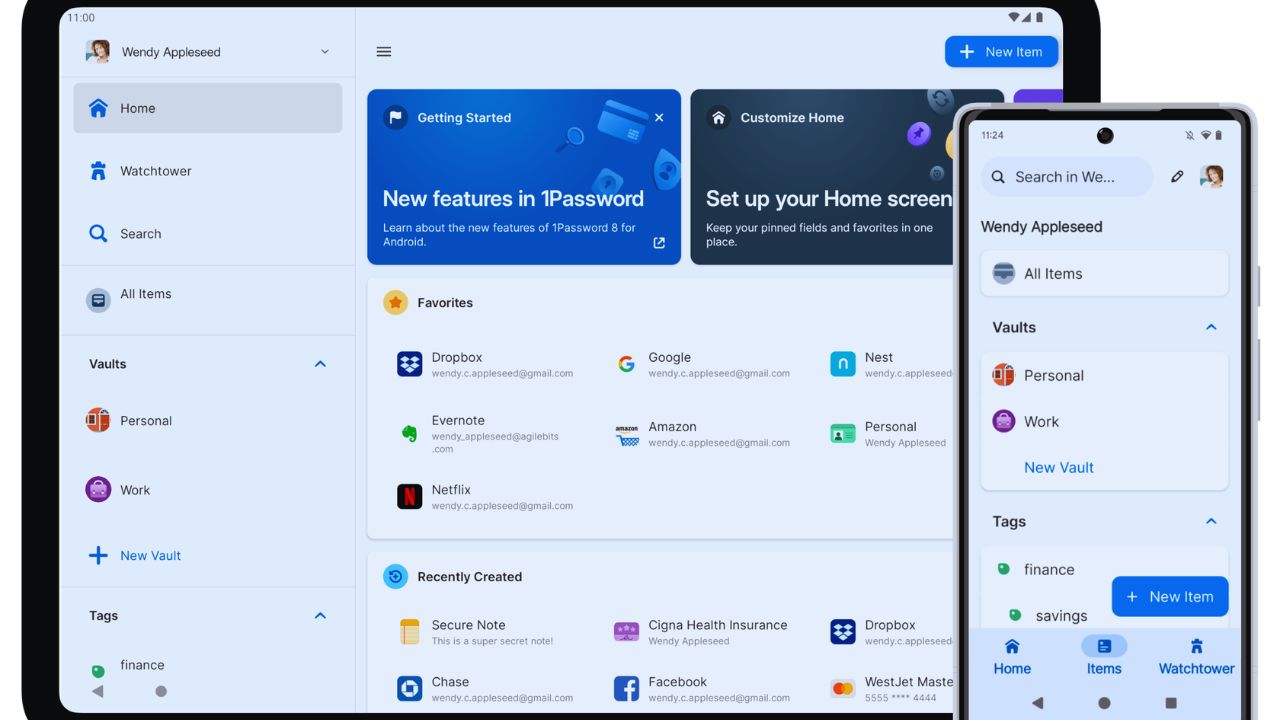
Business reports and Watchtower can flag weak, reused, compromised, or expiring credentials, plus other security issues in shared vaults.
That visibility helps an administrator decide where to begin after a vendor breach or audit request.
It cannot decide whether a warning is urgent, who owns the account, or whether a password change could break a production integration.
Set a monthly review: identify high-risk items, assign owners, and record the fix. This turns security alerts into accountable work, rather than another ignored dashboard.
Mixed Teams Benefit When the System Fits Both Technical and Everyday Work
A mature setup should not force developers into one tool and everyone else into another.
1Password can store everyday logins, payment details, secure notes, passkeys, and developer-related secrets in one account while access remains separated by vault.
That can be useful when marketing needs a brand account, finance needs a billing portal, and a technical team needs controlled service credentials.
Define what belongs in shared vaults, what stays personal, and what needs extra approval. Clear item ownership and sensible separation make the system easier to trust.
Passkeys and Browser Autofill Deserve a Deliberate Rollout
1Password can save and use passkeys in the browser, and Business administrators can control whether team members may use that feature.
That is useful, but it should not be turned on without considering shared-account workflows, recovery steps, and device coverage.
Browser autofill also needs testing on custom internal apps, multi-page portals, and unusual login screens; a team should know when manual selection is safer than accepting a suggestion. Test the everyday path before setting policy. That builds user confidence and avoids surprise lockouts later.
The Friction Usually Appears During Migration and Offboarding
Importing passwords is easier than deciding which old records are current, duplicated, shared, or no longer safe to keep.
A rushed migration can preserve years of poor habits inside a cleaner interface.
Start with critical systems, identify a current owner for each shared item, and archive credentials nobody can explain.
Then test offboarding with a noncritical account: remove access, check vault membership, and confirm a replacement owner can still work. This is where access hygiene becomes more valuable than bulk migration speed.
Also Read: ClickUp Who This Digital Tool Is Best For (and Who Should Skip It)
Three Decisions Prevent Most Early Confusion
Before inviting the organization, settle these rollout rules with the people responsible for security and operations:
- Which vaults hold critical credentials, and who approves access?
- How will joiners, movers, and leavers receive or lose permissions?
- Who reviews Watchtower findings and closes the highest-risk actions?
Choose a Plan for Governance, Not the Lowest Starting Price
Pricing, seat rules, reporting, guest access, identity integrations, and enterprise controls can change, so confirm terms before purchase.
A small team may only need shared vaults, role-based permissions, and simple administration. A larger organization may need SSO, automated provisioning, reports, policies, and an audit trail.
Do not buy a higher tier because it offers every possible control; choose it because a named owner will use those controls. Compare ongoing administration with risk reduction, not price alone.
Conclusion: The Tool Is Reliable Only When the Process Around It Is
1Password is a strong option for professional teams that need credentials shared across people, devices, and changing roles without relying on chat messages and personal spreadsheets.
Its encryption model, Secret Key approach, Business reporting, vault controls, passkey support, and SSO options provide useful building blocks. But the rollout succeeds only when access is limited, ownership is documented, and reports lead to action.
Begin with a few high-value systems, test handoffs, and make offboarding part of the first setup. With clear governance and regular review, it can reduce credential chaos without becoming another ignored security tool.












