Picking a video call platform feels like choosing a phone plan. The price tags blur together, the feature lists overlap, and nobody reads the fine print until something breaks mid-presentation.
The Zoom vs Google Meet debate has shifted dramatically since 2024. AI summaries, real-time translation, and post-call action items now carry more weight than camera quality or background blur.
This comparison is for team leads and ops managers deciding which platform to standardize across 10 to 200 people. Not freelancers hopping between apps, and not IT directors buying enterprise licenses.
One platform wins on speed. The other wins on control. The split happens in a place most comparison articles completely ignore.
Zoom vs Google Meet: The 2026 Feature Comparison
Both platforms handle a basic one-on-one call without drama. The differences surface when meetings get bigger, longer, or more public-facing, and that’s where the comparison gets interesting.
A side-by-side snapshot of how each platform performs across daily-use categories saves hours of back-and-forth research:
| Category | Zoom | Google Meet |
|---|---|---|
| Join Experience | Desktop app install required | Opens directly in browser |
| Host Controls | Waiting rooms, co-hosts, granular permissions | Mute, remove, control presenting |
| AI Post-Meeting Tools | AI Companion: summaries, action items, chapters | Gemini: notes, translation, proxy attendance |
| Recording | Local (free), cloud (paid) | Cloud on paid Workspace tiers, saved to Drive |
| Best Event Format | Webinars, registration, branded events | Internal broadcasts within Workspace |
| Chat Persistence | Continuous thread before, during, and after | Resets when participants rejoin |
The takeaway: Google Meet is the faster daily driver, while Zoom is the heavier tool built for structured sessions and external audiences.
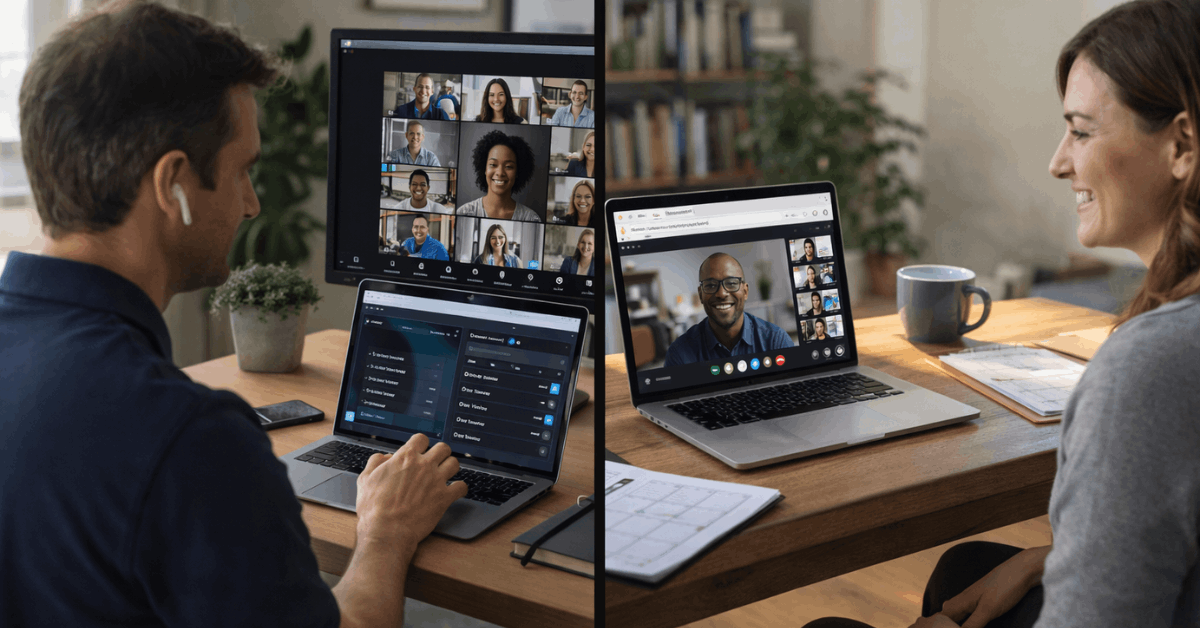
Why Google Meet Feels Faster for Small Teams
Google Meet loads in a browser tab. No app download, no forced updates interrupting a 9 AM standup. Calendar invites auto-generate meeting links, and Drive attachments sit right inside the same invite.
For teams already spending their entire day inside Gmail, Docs, and Sheets, Meet cuts the context-switching that kills focus during short check-ins. I’d estimate that zero-install joining saves roughly 15 to 30 seconds per meeting, which sounds trivial until a 12-person team runs 6 daily syncs.
Where Zoom Still Pulls Ahead
Larger meetings expose platform gaps quickly. Zoom’s waiting rooms, pre-assigned breakout rooms, and co-host roles give meeting organizers the kind of crowd management that Google Meet simply does not offer at the same depth.
Training cohorts depend on breakout room reshuffling, broadcast messages, and session timers. Classrooms at scale need these same controls. The phrase “Zoom breakout rooms” still drives platform decisions for workshops and cohort-based learning programs because no other tool matches the granularity.

AI Meeting Features: Zoom AI Companion vs Google Gemini
This is the section that separates 2026 from every previous year of this comparison. AI tools now determine how much post-meeting busywork gets eliminated, and the two platforms take different approaches.
Zoom AI Companion on Paid Plans
Zoom AI Companion is bundled into paid Zoom plans at no extra charge. It generates meeting summaries, pulls out action items, and answers questions like “What decisions were made?” while the call is still running.
Generated chapters and highlight reels mean stakeholders who missed the call can skim a 60-minute recording in under 10 minutes. That time-savings compounds fast across a team running 20+ meetings per week.
Google Gemini for Workspace
Google Gemini brings meeting notes, caption translation, and a unique feature: proxy attendance where a message can be delivered on your behalf during a session. International teams benefit heavily from real-time translation during multilingual calls.
The catch is availability. Gemini features are tied to Workspace plan tiers, not a standalone Meet toggle. A team on Business Starter won’t see the same AI tools as a team on Business Plus or Enterprise. Procurement teams should confirm which Gemini features their current Workspace tier includes before assuming access.
Chat, Collaboration, and the Late-Joiner Problem
Most Zoom vs Google Meet articles list chat as a minor feature. I think that’s a mistake, specifically because Zoom’s continuous meeting chat solves a problem that Google Meet creates every single day.
Zoom’s Persistent Chat Thread
Zoom keeps a chat thread alive before, during, and after a scheduled meeting. Links shared 10 minutes before the call? Still visible to someone who joins 5 minutes late. Files posted during the call? Available after the call ends.
This eliminates the common “can someone re-paste that link?” interruption that derails meetings when people join from different time zones or get pulled away by a phone call.
Google Meet’s Resetting Chat
Google Meet’s chat resets when participants rejoin. The upside is cleanliness: no stale threads cluttering the window. The downside is practical: late joiners miss links, context, and shared resources.
For scheduled internal standups where everyone arrives on time, this barely matters. For cross-timezone calls or external client meetings where people trickle in, it creates friction that most teams don’t notice until they’ve dealt with it for months.
I think chat persistence is a more impactful differentiator than browser-based joining for teams running 4+ meetings per day on Zoom. The conventional wisdom says Google Meet is always the better pick for small teams because it loads faster.
My position: losing shared links and context 6 times a day costs more cumulative time than the 20 seconds saved by skipping an app download.
Also read: Zapier: Real-Use Issues You Should Be Aware Of
Recording, Storage, and Where Your Files End Up
Recording policies and storage locations matter more than most teams realize until they need to find a specific recording from three months ago.
Paid Google Workspace tiers enable Meet recording with automatic delivery to Google Drive. Permissions, archival policies, and retention controls all live in the same domain. Teams that standardize on shared Drives will find their recordings exactly where they expect them.
Zoom allows local recording on the free tier and cloud recording on paid plans. AI Companion adds chaptering and highlight workflows that speed up post-production. Larger programs distributing recordings to external audiences often prefer Zoom’s export and chaptering tools.
The common mistake here: assuming recording is included on every plan. Google Meet recording requires Business Standard or higher. Zoom cloud recording requires a paid plan. Verify recording access on your specific tier before committing.
Live Streaming, Webinars, and External Events
Event delivery is where these platforms pull farthest apart. Teams that never host webinars won’t care. Teams that run quarterly launches, training days, or public demos should pay close attention.
Zoom Webinar Tooling
Zoom’s webinar features include registration pages, capacity add-ons for large audiences, Q&A moderation, and branded experiences built for launches and conferences. Multiple presenter roles and layered audience engagement give event teams the control they need.
Google Meet for Internal Broadcasts
Google Meet handles streaming well for internal briefings and company-wide broadcasts within the Workspace ecosystem. External-facing events that need registration, tiered audience management, and branded landing pages are better served elsewhere.
Event-heavy organizations should run at least one test event on each platform before signing an annual contract. The gap between reading a feature list and running a live session with 200 attendees is enormous.
Security, Privacy, and Admin Controls in 2026
Both platforms now include encryption in transit and multiple authentication options. The pandemic-era concerns about Zoom security are largely resolved. Current admin features support strict profiles, waiting rooms, and emergency suspension of participant activities when a session goes sideways.
Google Meet benefits from default Workspace controls and Drive-based storage permissions that many compliance teams already trust. Sensitive or public sessions should test entry restrictions, screen share policies, and recording defaults in a staging meeting before going live.
A precaution worth mentioning: both platforms tie security features to plan tiers. Free or starter plans may not include the admin controls a compliance-conscious team needs. Check admin feature availability on your specific Workspace or Zoom pricing tier against your organization’s requirements.
Scheduling Workflows and Google Workspace Integration
Calendar-first teams gain speed from Meet’s automatic meeting links and Drive attachments embedded in the same invite. Zoom scheduling ties into both Google Calendar and Outlook, but exposes more configuration options during setup: passcodes, waiting room toggles, and registration requirements that scale meetings demand.
Zoom’s scheduling flexibility suits organizations juggling multiple calendar systems or external participants who don’t share the same Workspace domain. Meet’s scheduling speed suits teams that live entirely inside Google’s ecosystem and rarely invite outside guests.
Teams should also factor in these practical considerations before standardizing:
- Trial both platforms for at least two weeks before committing to an annual plan, testing with real meeting sizes and formats
- Verify AI feature availability on your specific plan tier, since both Zoom AI Companion and Google Gemini restrict features by pricing level
- Test recording and storage workflows to confirm files land where your team expects them and comply with retention policies
- Run a mock external event if webinars or public sessions are part of your workflow, because feature lists don’t capture the live experience
The biggest procurement mistake teams make is comparing feature lists without testing real workflows, then discovering gaps 6 months into an annual contract.
Questions People Ask About Zoom vs Google Meet
Q: Can I use Google Meet without a Google Workspace subscription?
Google Meet has a free tier that supports basic video calls with time limits. Paid features like recording, longer meetings, and Gemini AI tools require a Workspace subscription at Business Standard level or above.
Q: Does Zoom AI Companion cost extra on paid plans?
Zoom AI Companion is included on paid Zoom plans without an additional charge. Webinar capabilities and large meeting capacity are separate add-ons that carry their own pricing.
Q: Which platform has better breakout rooms in 2026?
Zoom’s breakout rooms remain the stronger option, with pre-assignment, room reshuffling, broadcast messaging, and session timers. Google Meet has added basic breakout functionality, but the controls are less granular for workshop-style sessions.
Q: Is Zoom still safe to use after the 2020 security issues?
Zoom has overhauled its security features since 2020, adding waiting rooms, strict authentication profiles, and emergency session controls. Admin safeguards on current paid plans are on par with enterprise expectations.
Q: Can Google Meet handle large webinars for external audiences?
Meet handles internal broadcasts well within Workspace, but lacks the registration pages, branded event experiences, and tiered audience management that Zoom webinar tools provide for external-facing events.
Conclusion
The Zoom vs Google Meet decision in 2026 depends on how your team runs meetings, not which logo looks better on the invite. Small teams inside Google Workspace will move faster with Meet’s browser-first simplicity and Drive integration.
Larger teams running training programs, external events, or cross-platform workflows will find Zoom’s host controls and AI chaptering worth the app install. Test both on real meeting formats before signing anything annual.