
The Notion learning curve is less about memorizing buttons than deciding what needs a page or database.
It affects students, freelancers, and teams seeking one place for working information without spending days building a dashboard.
The blank workspace can feel unusually open after a simple notes app or task board with fixed rules. This guide explains early confusion, how to avoid overbuilding, and when another tool may meet a more immediate need.
Why a Blank Workspace Can Feel More Difficult Than a Busy Interface
Notion offers pages, blocks, templates, databases, views, and links without demanding one sequence.
That freedom helps once work is clear, but can feel like getting shelves before knowing what to store.
A newcomer may create several homes for the same notes, then lose the current one.
The challenge is choosing a small starting point and accepting a plain first version. A page can be revised later, so early choices are rarely permanent.
Templates Can Get You Moving—or Keep You Shopping
Notion’s template gallery includes pages for personal plans, editorial calendars, documentation, and project work. Use one only when it resembles a recurring task, such as weekly content planning or a reading list.
Trouble begins when a new user copies elaborate systems and studies properties before entering real work.
Pick one that is roughly right, remove unused sections, and let real daily use show what belongs; that turns a borrowed layout into something maintainable.
Use the First Week to Solve One Repeated Problem
The fastest route through the learning curve is not a master dashboard. Choose one process that sends you hunting: article pitches, client calls, research, or course notes.
Build only what it needs, then use it for a few days. A freelance writer might keep assignments, deadlines, sources, and draft status together before adding another system.
This keeps the learning process tied to a useful outcome, rather than a separate hobby.
Give Your Home Page a Routing Job
A home page should point to active work, not hold every database, widget, and idea. It can link to a project, revisited notes, a weekly checklist, and a small inbox.
Keep it short enough to show the next step. When it becomes a crowded control panel, navigation slows.
A focused home page creates a calmer entry point while leaving detailed information where it belongs.
Wait to Build a Database Until a List Starts Asking Questions
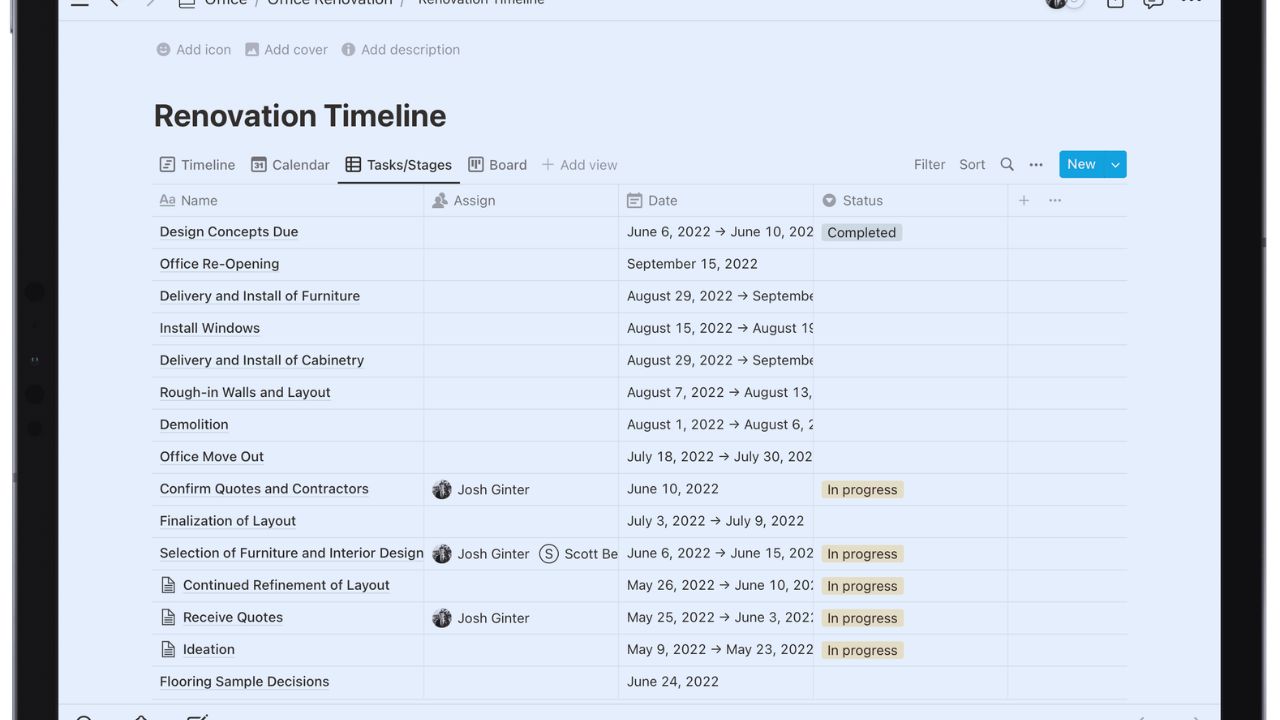
A simple page works for a short checklist or a one-off note. A database is worthwhile when a collection needs sorting, filtering, owners, dates, or views.
An editorial tracker may need writer, due date, stage, and topic; a book list only title, author, and status. Avoid properties a template happens to contain.
Keeping fields that change a decision protects quick updates and keeps search and filtering useful later. Start with one familiar view before creating alternatives.
The Second Week Is Usually About Finding Things, Not More Features
Once pages contain real notes, the question becomes: “Can I find yesterday’s work without five clicks?” Clear titles, a modest hierarchy, and consistent labels solve more than decorative covers.
Rename pages clearly, then archive stale material instead of leaving it beside active work.
This creates better retrieval and gives the workspace memory instead of relying on personal recall.
Collaboration Needs a Few Rules Before More People Join
Shared pages can keep comments, decisions, and reference material together, but a team needs an owner for final updates.
Decide which pages are drafts, approved references, and question spaces. A meeting page can record a decision, owner, and follow-up date; the tracker holds tasks.
Link the page to the work it affects so newcomers can see why a decision changed and where the next answer lives. This prevents a final answer from being scattered between a DM, meeting, and draft.
Also Read: Canva Ease of Use Review: What Beginners Should Expect
Some Parts of Notion Stay More Demanding Than Others
Flexibility does not remove the work of structuring information. Linked databases, formulas, permissions, and advanced views can help, but need more care than a note or to-do list.
A team may need someone able to simplify the setup as it grows. Separate everyday use from workspace administration so ordinary work is not held up by design decisions.
Mobile and Large Workspaces Need Realistic Expectations
Mobile is convenient for reading, checking a task, adding a quick note, or commenting between appointments.
Building a wide database or reorganizing a knowledge hub is easier on desktop. In a large workspace, search and structure matter more as pages multiply.
Test it in the places you work before promising frictionless access to every kind of work. Use a short capture page for field notes instead of rebuilding a full structure from a phone.
Notion Often Suits People Who Need Information to Stay Connected
It may fit a student linking notes to assignments, a consultant keeping a brief beside call notes, or a small team maintaining a playbook next to projects.
The shared need is to revisit information, change it, and use it elsewhere. People who enjoy shaping a system may find the flexibility rewarding.
They should avoid confusing customization with progress, especially when the actual work is waiting.
A Smaller Tool Can Be the Better Choice
Someone wanting reminders, a shared grocery list, a visual board, or an engineering tracker may prefer a tool built for that job.
A fixed system can be easier for strict dependencies, regulated records, high-volume tickets, or a process nobody should redesign.
Pairing Notion with a specialist tool may beat forcing every workflow into one workspace. Boundaries keep the system usable and protect the work itself.
Try a Five-Day Test Before You Commit to a Bigger Build
Use one small project: a new client, content cycle, or week of study notes. Do not judge polished pages.
Judge whether you can capture information, find it later, and share it without re-explaining the structure.
These checks center real working behavior over template appeal:
- Can you find a current answer in under one minute?
- Does each page have a clear owner or purpose?
- Did you remove anything that added work without value?
The Point Is Not to Master Everything at Once
A productive Notion setup grows from a small system people revisit, not a weekend-built digital headquarters.
Begin with one repeated problem, use official guides when blocked, and let normal work reveal what needs more structure.
Keep pages that reduce searching, copying, or confused handoffs, and retire the rest. That turns the Notion learning curve into a gradual design process instead of a test of whether you are “technical” enough.












