
A useful Trello overview begins with the work that keeps disappearing into chat, inboxes, and personal notes. Trello turns tasks into boards, lists, and cards, giving a team a shared picture of what happens next.
That is why people often understand it within minutes, even without formal project-management training.
The harder question is whether that card-based simplicity still works when approvals, reporting, client access, and several teams enter the picture.
The First Board Usually Solves an Everyday Problem
Imagine a small marketing team preparing a launch. One list holds ideas, another contains active work, a third waits for approval, and a final list records completed assets.
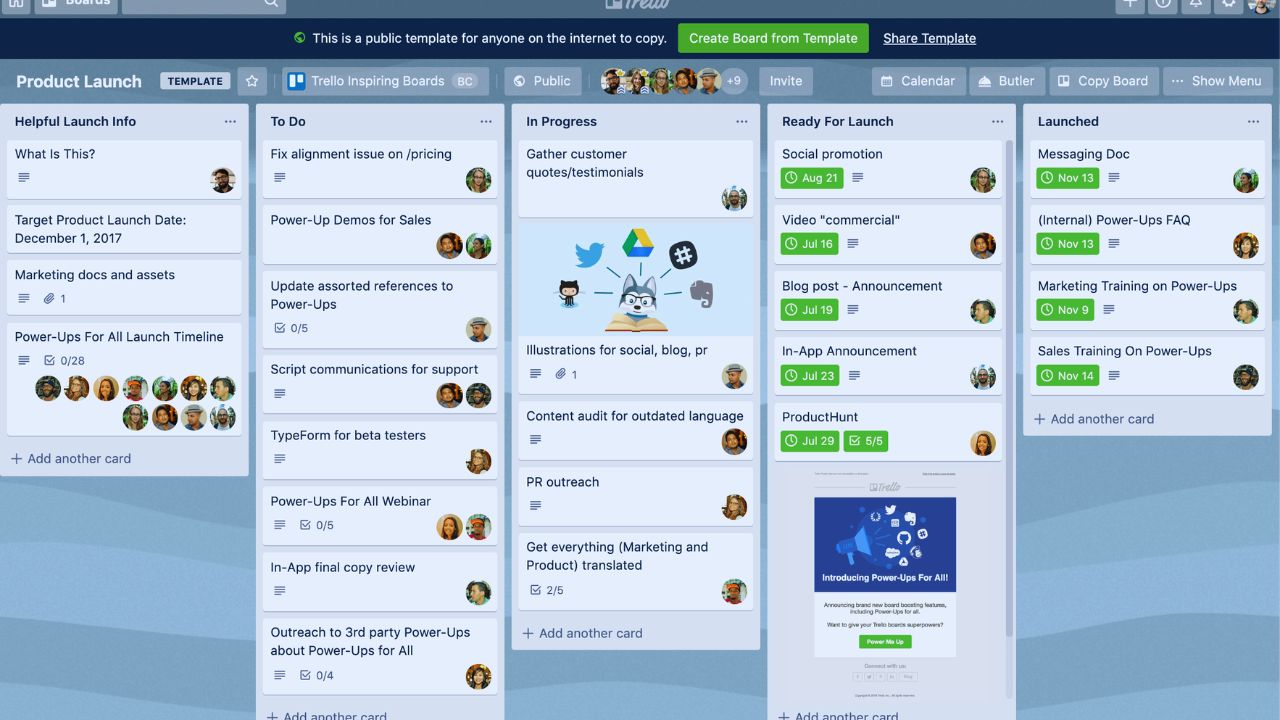
A card can include an owner, due date, checklist, comment thread, and file, so the context follows the task instead of being scattered across messages.
This visual workflow is Trello’s clearest advantage: a teammate can see progress without asking for an update. It is particularly effective when the team needs shared visibility, not a detailed operating system.
Make Each Card Small Enough to Be Honest
A card should state what needs doing, who owns it, and what “finished” means. When a single card represents an entire campaign, website redesign, or client relationship, status becomes vague and nobody knows the next move.
A better content card names the article, draft link, reviewer, and publication date; an event card can contain the venue confirmation, speaker task, and budget note.
That discipline supports daily coordination and reduces silent assumptions before they turn into missed work.
Trello Feels Easy Because It Asks for Very Little Up Front
A first board can be useful within an hour. Name lists in the language people already use, add only live tasks, assign owners, and review it during the next meeting.
This low setup burden can suit side projects, small agencies, volunteer groups, and teams replacing a messy mix of spreadsheets and messages.
It offers quick clarity without demanding heavy process design before people know what they need.
Templates and Automation Work Best After the Routine Is Clear
Templates can speed recurring work such as client onboarding, content production, event planning, or new-hire checklists. Built-in automation can move a card, assign someone, apply a label, or send a reminder when a defined trigger occurs.
Neither feature fixes a confused process. Start with a board people already use, remove fields and checklists nobody needs, then automate only a repeatable handoff. That keeps familiar routines intact and gives automation rules a clear purpose.
Automation quotas also vary by plan and are shared across the workspace, so a high-volume board should be watched during its first busy month rather than assumed to run without unexpected limits or disruption.
Scaling Problems Usually Begin With Information That Must Connect
Trello cards can hold labels, members, attachments, dates, checklists, and custom fields. That is enough for a single campaign or a light request queue, especially when every card follows the same convention.
Trouble begins when a team must connect several boards, vendors, budgets, dependencies, and initiatives without copying data.
Cards do not function like linked records in a relational database. At that point, card simplicity can become a data limitation, even when the board still looks tidy.
Extra Views and Add-Ons Do Not Automatically Create Better Reporting
Additional views can help a team see deadlines, workload, or projects from another angle, while Power-Ups and integrations can add calendars, forms, files, and reporting tools.
They can be useful extensions, not proof that every workflow belongs in Trello. Each addition also brings settings, permissions, billing, and a new possible point of failure.
Test real information before committing. Good reporting depends on consistent inputs and clear definitions, not an attractive dashboard.
Keep Communication Near the Task, but Record Decisions Properly
Comments on a card are helpful when the discussion concerns that exact item.
Broader planning, policy questions, and conversations affecting several projects may still live in chat or documents.
That is not a failure as long as the team decides where the final answer will be recorded.
Otherwise, a card can say “approved” while the reason, revised file, and next action remain elsewhere. Protect decision history and working context rather than forcing every conversation into one tool.
Simple Guardrails Prevent a Board From Becoming a Digital Attic
Trello needs less governance than many platforms, but it still needs a few shared habits.
These small guardrails protect board clarity without making the workspace feel bureaucratic:
- Every active card has one accountable owner.
- Labels mark a limited set of useful signals.
- Old cards are archived before they hide the current queue.
Permissions and Guests Need Attention Before a Sensitive Card Appears
Boards can use different visibility and participation settings, so an administrator should decide what is private, what can be shared with a workspace, and what an external guest may change.
This matters for agencies, client projects, hiring, finance, and internal planning. Assign a board owner, review inactive collaborators, and document how access is removed after a project ends.
Those steps create appropriate access and predictable administration without making everyday work harder.
Also Read: Asana vs ClickUp: Final Comparison Verdict Based on Testing
Who Gets the Most Value From Trello?
Trello suits people who think visually, have a manageable number of moving tasks, and prefer a light process over a detailed schema.
It can work well for editorial calendars, simple sales pipelines, classroom projects, content approvals, event preparation, and onboarding.
It is less convincing for complex software delivery, regulated workflows, enterprise resource planning, or organizations that need deep reporting and granular governance. The difference is workflow complexity and decision volume, not whether a team is serious about its work.
Run One Real Process Before Moving Everything
Do not migrate every project at once. Choose a workflow with a known problem, such as client requests trapped in email or a content process with unclear approvals.
Run it in Trello for several weeks, notice where cards stall, and ask whether people stop relying on side channels.
A successful pilot produces adoption evidence and honest tradeoffs. A difficult pilot may show that the team needs more structure, not more training.
Conclusion: Let Simplicity Remain the Point
Trello is a strong choice when a team needs to see work, move it forward, and avoid needless process overhead.
Its boards, cards, templates, views, automation, and integrations can support more than a basic to-do list when rules stay lean.
But teams should notice the point where disconnected boards, add-ons, and manual reports cost more than they save. Start with one important workflow, keep ownership visible, and reassess when work volume or governance needs begin to change.












