
A long interview is painful to edit when false starts, repeated thoughts, and missed words sit on a crowded timeline.
Descript takes a different route, turning speech into an editable script so a producer can cut a sentence like a line in a document.
That approach suits podcasts, webinars, tutorials, and founder-led videos where the spoken story carries the project. This Descript review explains where that workflow saves time, where it needs human judgment, and which teams may prefer a traditional editor.

Descript Makes the Most Sense When Words Drive the Edit
The platform is built around spoken material that needs to become clearer, shorter, and easier to publish.
A marketing team trimming a customer interview can read the transcript, remove a wandering answer, and see the change carry through to the media.
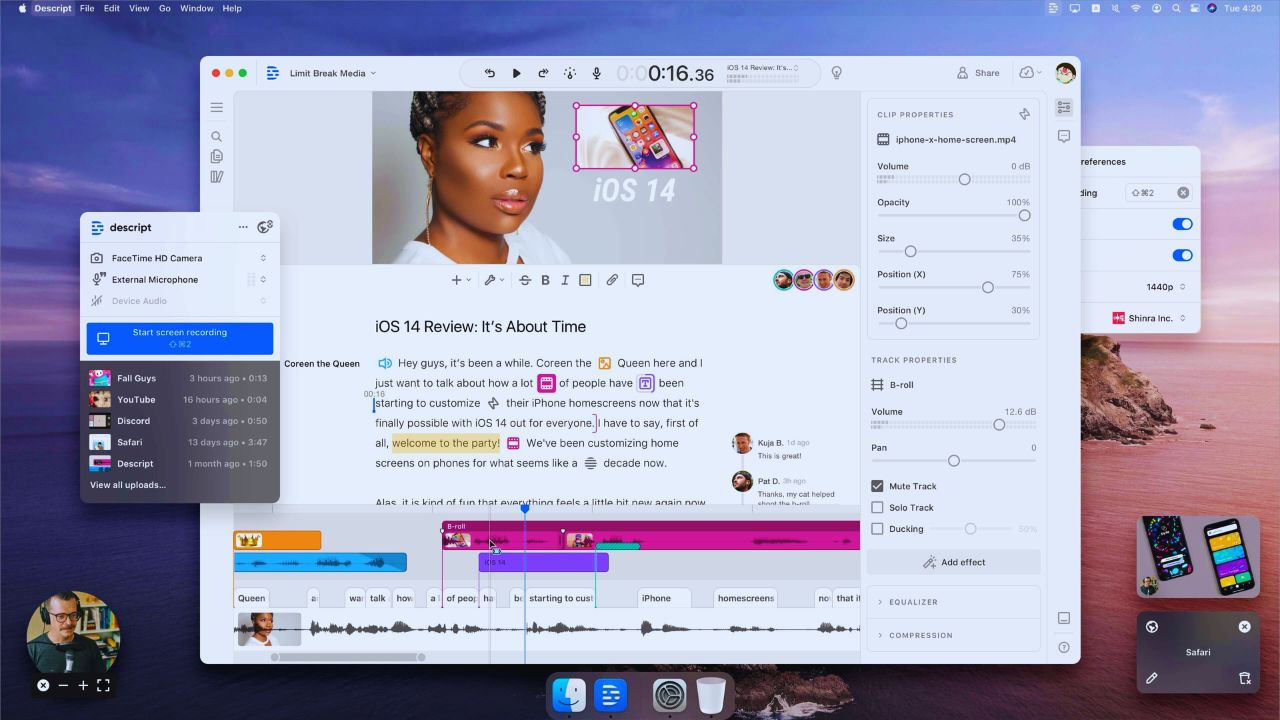
A course creator can move an explanation before a demo without rebuilding the sequence by hand. For those jobs, text-led editing removes much of the timeline friction.
The Transcript Is a Fast Route to a Better Rough Cut
Deleting filler, tightening a rambling response, or moving a short section feels familiar because the work happens in the script.
Descript can identify speakers, useful when several people appear in one recording.
The transcript is not ready to publish untouched: names, specialized terms, overlapping speech, and accents still need a careful listen, when captions or claims will be public. Treat it as an editing map, not a final record.
The Best Time Savings Come Before Fine Finishing
A rough cut is where dialogue-heavy productions often lose hours.
Descript makes it easier to remove a false start, test a shorter opening, or pull a quote into a separate composition.
It also supports recording, importing, scene work, and a timeline when the visual edit needs closer attention.
Traditional editing does not disappear; first-pass decisions simply become faster, and review conversations become easier to follow.
Studio Sound Can Improve a Recording, but It Cannot Rebuild One
Studio Sound is designed to reduce background noise and improve clarity, which can help an interview recorded in a reflective room or home.
Use it gently and compare the processed version against the original.
Severe clipping, a distant microphone, interruptions, or two people talking over one another will still limit the result.
Good capture remains the first safeguard; AI cleanup is a finishing tool.
Quick AI Actions Still Need an Editorial Pass
Descript can remove filler words and retakes, create shorter clips, and generate titles, summaries, show notes, descriptions, and social captions.
These tools can turn a finished recording into a distribution package without extra apps.
They can also flatten a speaker’s voice, overstate a conclusion, or choose a weak moment as the hook.
Check every factual name, number, claim, and selected clip before release. The useful role is draft acceleration, not automatic publishing.
Synthetic Fixes Are Strongest When They Stay Small
Descript’s Regenerate feature can replace selected spoken words with AI speech, useful for correcting a mispronounced name, changed date, or missing phrase.
It should not casually rewrite the meaning of an interview after the fact. A longer replacement may feel less natural than a real pickup, when pace or emotion changes.
Keep a version history and follow any disclosure standard that applies. That protects editorial integrity and audience trust.
Collaboration Is Easier When Reviewers Can Read the Work
A client or executive who dislikes video software can open a project, read the transcript, leave a comment, and point to the exact moment that needs attention.
That helps agencies and marketing teams turn vague feedback, such as “the middle drags,” into an edit. Shared review works best when one person owns the final cut; otherwise comments become competing instructions.
Give reviewers a deadline, define what they can approve, and record the result. That creates specific feedback and fewer revision loops.
Reusable Layouts Help Series, Not Every Video
Layout packs, captions, scene tools, and export options can make recurring episodes feel consistent.
A weekly webinar series may use the same speaker framing, title treatment, lower thirds, and vertical clip format without rebuilding them each time.
Yet a repeatable layout cannot rescue a poorly structured episode. Build the narrative first, then use templates to support it.
The strongest output combines repeatable branding with story-specific choices.
Descript Is Not the Right Finish Line for Every Production
The platform can handle basic visual editing and sound polish, but it is strongest when the spoken script remains central.
A filmmaker shaping a dramatic sequence, a music producer balancing a dense mix, or an editor building complex effects may need deeper tools for color, audio routing, keyframes, and frame-level control.
A hybrid workflow can make sense: create the rough cut and transcript cleanup here, then move the sequence into a specialist program. That respects production needs and editorial control.
Credits, Cleanup, and Scale Can Change the Cost
Before choosing a plan, estimate recording minutes, then account for AI credits used by Studio Sound, filler removal, clips, and AI writing.
Credits may not map neatly to episodes, particularly when a team tests variations. Large projects need tidy file names, speaker labels, and folders.
Check plan limits, storage, export needs, and team access before treating the listed price as the whole cost. That is production planning, not a minor subscription detail.
Also Read: Zapier How Well This Tool Integrates With Others
Test It on One Real Episode Before Changing the Whole Workflow
A trial should use a normal project, not a clean demo recording. Choose an interview, tutorial, panel, or training video that includes the usual pauses, corrections, graphics, and approval process.
Compare the time needed to produce a rough cut, correct the transcript, gather feedback, create clips, and export.
Notice where people still leave the tool or where quality drops. That shows actual workflow fit more clearly than a feature tour.
Three Questions Keep the Test Honest
Use these practical checks when you review a real production:
- Did transcript editing reduce the time to a reviewable cut?
- Did AI tools save time without creating more fact-checking?
- Can the team finish its normal audio and visual polish here?
Conclusion: Let the Format Decide
Descript is a strong option for teams producing spoken content that needs faster rough cuts, collaborative review, captions, and repurposed clips.
It is less compelling when a project depends on dense sound design, advanced motion, detailed color work, or precise frame-by-frame storytelling.
Run one real episode through the full process, including revision and export, before changing your tool stack. That approach reveals whether text-first editing reduces real work or simply moves production complexity to another stage.












