Slack looks simple when a team first opens it: messages arrive, people react with emoji, and a channel seems easier than email.
The useful Slack features appear later, when someone needs Tuesday’s decision, an urgent request must reach the right person, or an outside partner needs a safe place to collaborate.
It can make communication more visible and reduce repeated questions, but only when the workspace has basic agreements about where work belongs. This guide covers what matters once the novelty fades.
A Channel Is Not Just a Group Chat
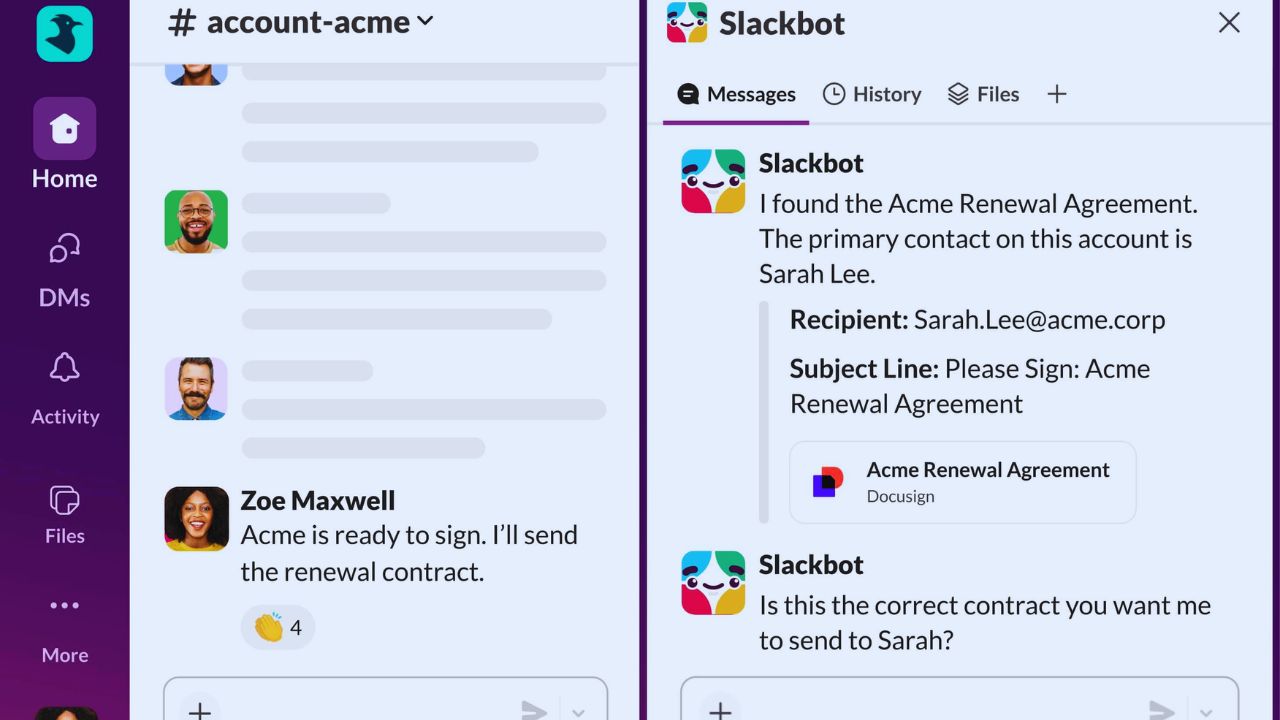
A channel needs a real job: one project, customer, service area, launch, or ongoing responsibility.
A vague name and no description invite unrelated messages, leaving others unsure whether an answer is current.
Add a short purpose statement, invite the right people, and keep decisions beside the work. That turns shared conversation into a reliable record, not a faster inbox.
Start With Fewer Places to Talk
New teams often create a channel for every idea, then add more when nobody knows where a question belongs.
Begin with announcements, active projects, departments, and a small number of recurring-request spaces.
Keep private channels for genuinely sensitive work rather than ordinary decisions. This makes search results clearer and reduces duplicate questions.
Direct Messages Are Useful, but They Can Hide the Work
A direct message works for a private check-in or a small question affecting nobody else. It becomes costly when a decision, file, or explanation will guide a wider group later.
Move the useful final outcome back into the relevant channel, even when the discussion began privately.
New project members should not need to ask what was agreed last week. That protects team memory and gives new contributors a fair starting point.
Threads Keep the Main Conversation Readable
Use threads for follow-up questions, detailed review, or a side issue tied to one original message; leave the main channel for updates everyone must see.
A well-used thread lets readers see why a decision changed without scrolling through unrelated chatter.
It also reduces the urge to post a new message merely to get attention. The result is cleaner context and fewer interrupted discussions.
Notifications Need Rules Before They Need More Settings
Slack can notify people on desktop, mobile, and email, so a mention carries more weight than it did in an old office chat room.
Agree on urgency, when to use @here or @channel, and when replies can wait. Statuses and do-not-disturb schedules help, but managers must model those boundaries.
The goal is responsive communication, not constant interruption.
A Huddle Is Better Than Twenty Messages
When a question needs a two-minute screen share, a huddle can settle it faster than a long written exchange.
It works for debugging a small issue, choosing between designs, or checking a document before publishing.
Afterwards, put the decision, owner, and next step in the channel or a canvas. Otherwise, the speed of the call creates invisible decisions and leaves future readers without a record.
Search Only Helps When People Leave Useful Clues
Slack search can surface messages, files, people, and channel names; filters narrow results by date, participant, or place.
It becomes valuable when posts use clear terms, files have meaningful names, and final decisions are written plainly rather than buried in reactions.
A support team can find an earlier workaround if an incident channel names the affected service and final fix. That makes searchable history part of the daily workflow, not an emergency tool.
AI Summaries Are a Shortcut, Not the Source of Truth
Slack AI can summarize channels, threads, and direct messages, answer questions from accessible workspace material, and recap lower-priority channels.
It helps when someone returns from leave or joins an established project, but a summary can miss the condition that changed a decision.
Check the linked messages before acting on a customer commitment, security issue, or staffing change. Use AI recaps to catch up, then rely on the underlying record when stakes are real.
Workflows Help When a Request Has a Predictable Route
Workflow Builder can collect information through forms, route requests, post reminders, and trigger actions in supported services.
It suits intake processes that otherwise begin as incomplete messages: a campaign request, equipment issue, access question, or new-hire task.
Write the process in ordinary language first, including the owner, required information, and what happens when a request is incomplete.
This keeps automation attached to a real operating process, not hidden confusion.
Also Read: Learning Curve Explained for New Users: My Experience with Notion and Why It’s Worth It
Someone Must Own the Automation After It Goes Live
A workflow can break quietly when permissions change, a field is renamed, or a team alters the process it supports.
Give every automation an outcome-based name, document its owner, and review failures instead of assuming they resolve themselves.
Keep approval steps for sensitive access, money, or customer promises even when routing is automatic. That makes maintenance visible and protects human accountability.
Slack Connect and Plan Choices Need Deliberate Boundaries
Slack Connect can bring customers, agencies, suppliers, or partners into shared channels, reducing email forwarding and keeping files and decisions near the work.
Before inviting anyone, decide what the channel is for, who may share material, and how it will close after the work ends.
The free plan offers 90 days of searchable history and limited app integrations; paid plans expand history, app access, workflows, and administration.
Business+ and Enterprise plans also support data residency, so select a plan around compliance needs and real workload, not headcount alone.
Three Defaults That Make a New Workspace Easier to Use
Start small. These early agreements make everyday collaboration less noisy:
- Name channels by their clear purpose.
- Use threads for detailed follow-up.
- Put decisions back into the shared channel.
The First Month Reveals Whether Slack Is Helping
A good workspace should make a teammate’s day calmer, not merely faster.
After several weeks, look for questions still asked in direct messages, channels that never receive updates, and alerts everyone ignores.
Those patterns reveal a structure that is too complicated, too loose, or missing an owner. Adjust habits causing lost context before adding more apps and automations.
Conclusion: Treat Slack as a Shared Workplace, Not a Running Commentary
Slack becomes valuable when channels hold conversations that future work depends on, notifications reflect genuine urgency, and huddles end with visible follow-through.
Search, AI, integrations, and workflows can reduce chasing and repetition, but none repairs a workspace where decisions remain private or nobody owns a process.
Begin with a small channel structure, write down response expectations, and test one repeatable intake workflow. Over time, clear working habits matter more than any individual Slack feature.